How to transfer a list of options to a web report FastReport .NET
When you create reports, you often need to transfer some values from outside. This is to filter the data into the report, or to manage the logic of the report. In my practice of using FastReport.Net, I often encounter this need. Since I mostly work with web reports, I pass the parameters into the report through url. As a rule, my reports are quite complex and are not limited to one parameter. Therefore, there is a need to pass on a list of parameters, namely a list of key value sets. Where the key is the name of the setting.
It is certainly better to consider it by example. In this case, I use ASP .NET Core Web Api app.
namespace ParametersWeb.Models{ public class Reports { // Report ID public int Id { get; set; } // Report File Name public string ReportName { get; set; } }}
ValuesController:
Fill the array of reports:
Reports[] reportItems = new Reports[] { new Reports { Id = 1, ReportName = "Parameters.frx" }, new Reports { Id = 2, ReportName = "Master-Detail.frx" } };
Method of production of the report is asynchronous, since It uses an asynchronous method of converting the report in html format. This format we want to display the report in the browser, as you know:
[HttpGet("{id}")] public async System.Threading.Tasks.Task<IActionResult> GetAsync(int id) { string mime = "application/html"; // MIME header with default value // Find report var parameters = HttpContext.Request.QueryString.ToString().Substring(1); Reports reportItem = reportItems.FirstOrDefault((p) => p.Id == id); // we get the value of the collection by id if (reportItem != null) { string webRootPath = _hostingEnvironment.WebRootPath; // determine the path to the wwwroot folder string reportPath = (webRootPath + "/App_Data/" + reportItem.ReportName); // determine the path to the report string dataPath = (webRootPath + "/App_Data/nwind.xml");// determine the path to the database using (MemoryStream stream = new MemoryStream()) // Create a stream for the report { try { using (DataSet dataSet = new DataSet()) { // Fill the source by data dataSet.ReadXml(dataPath); // Turn on web mode FastReport Config.WebMode = true; WebReport webReport = new WebReport();//create the report object webReport.Report.Load(reportPath); //upload the report webReport.Report.RegisterData(dataSet, "NorthWind"); //register the data sourcw in the report if (parameters != null) { string[] parameterList = parameters.Split(','); foreach (string item in parameterList) { string[] parameter = item.Split('='); webReport.Report.SetParameterValue(parameter[0], parameter[1]); //set the report parameter value } } // inline registration of FastReport javascript webReport.Inline = true;//allow to register scripts and styles in HTML-body intead of putting them in the header HtmlString reportHtml = await webReport.Render(); //upload the report in HTML byte[] streamArray = Encoding.UTF8.GetBytes(reportHtml.ToString()); stream.Write(streamArray, 0, streamArray.Length);//write down the report in the stream } // Get the name of the resulting report file with the necessary extension var file = String.Concat(Path.GetFileNameWithoutExtension(reportPath), ".", "html"); return File(stream.ToArray(), mime, file); // attachment } // Handle exceptions catch { return new NoContentResult(); } finally { stream.Dispose(); } } } else return NotFound(); }
The essence of this method is the following - we upload the selected report template, parse parameters from the url and transfer their value to the report. Then, we transform a report in html format and return the file to the client.
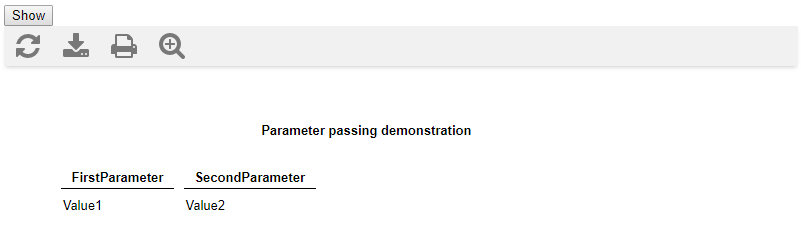
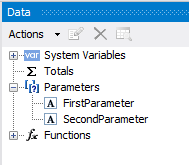
The names of the parameters that you pass to the report should clearly match the parameters in the report:
<!DOCTYPE html><html><head> <title></title> <meta charset="utf-8" /> <script src="/lib/jquery/dist/jquery.min.js"></script></head><body> <script> function call() { $.ajax({ type: "GET", url: "api/values/1?FirstParameter=Value1,SecondParameter=Value2", //contentType: "application/text; charset=utf-8", dataType: "html", success: function (data) { $('#results').html(data); console.log(data); }, //End of AJAX Success function failure: function (data) { alert(data.responseText); }, //End of AJAX failure function error: function (data) { alert(data.responseText); } //End of AJAX error function }); }; </script> <form method="GET" id="formx" action="javascript:void(null);" onsubmit="call()"> <input value="Show" type="submit"> </form> <div id="results" typeof="submit"></div><!—here will be the result--></body></html>